
A data cleansing algorithm is used to standardize varied spellings, misspellings, and abbreviations for the same name. For example, “Ariz,” “Az,” and “Arizona” can all be cleansed to “AZ.” Use this algorithm if the target data needs to be in a standard format prior to masking.
Creating a data cleansing algorithm via UI
-
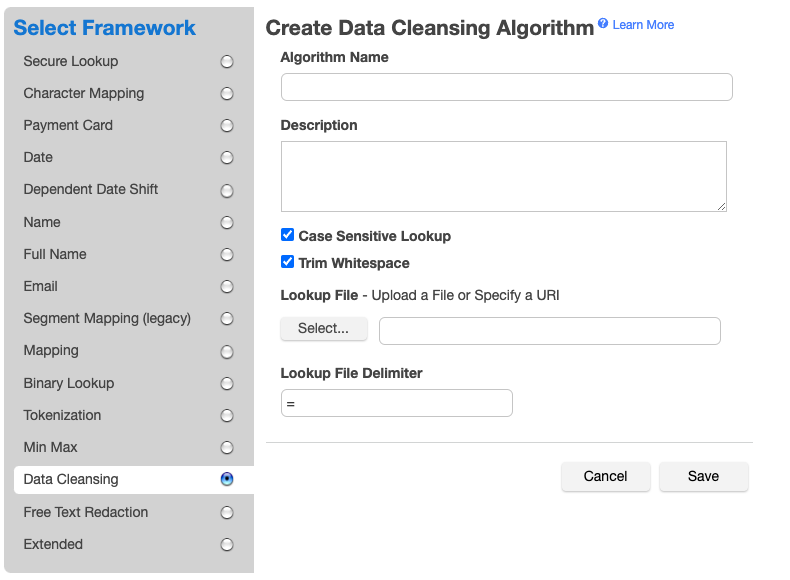
Enter an Algorithm Name.
Info:
This MUST be unique.
-
Enter a Description (optional).
-
Choose whether to use Case Sensitive Lookup. If this box is checked, the data to be cleansed must match the case of the value in the lookup file in order to be replaced.
For example, if the lookup file contains
Arizona=AZ:Original
Cleansed
Case Sensitive Lookup
Arizona
AZ
checked or not checked
arizona
AZ
not checked
arizona
arizona
checked
-
Choose whether to Trim Whitespace. If this box is checked, the leading and trailing whitespace of the data to be cleansed is removed prior to checking if the value is in the lookup file. This allows a single
value=replacementin the lookup file to cleanse data containing extraneous leading and trailing whitespace.Info
This must be checked to cleanse fixed-width files and fixed-length database data types such as CHAR and NCHAR.
-
Specify a Lookup File. You can either click the Select... button to choose a local file or enter the fileReferenceId value returned from the fileUpload API endpoint for uploading files to the Masking Engine. The file should contain a newline separated list of {value, replacement} pairs separated by the delimiter.
-
Specify a Lookup File Delimiter (value and replacement separator) up 50 characters long. The default delimiter is
=. You can change this to match the lookup file. -
Click Save.
Below is an example of a lookup file. It does not require a header. Make sure there are no spaces or returns at the end of the last line in the file. The following is sample file content:
NYC=NY
NY City=NY
New York=NY
Manhattan=NY
For information on creating Data Cleansing algorithms through the API, see API Calls for Creating Algorithms - Data Cleansing.